



It shouldn’t come as a surprise to any of you that I am a huge Google Earth nerd. I love geography. I love maps. I love Google.
It’s a simple formula. A + B = C. Maps + Google = Google Earth nerd.
So when Google pushed out an online version of GE this week, all was right with the world. At least until I started digging into it a little bit. Don’t get me wrong. Any time I can play with an online Google tool, it’s a good day.
The new version does have a few cool features. But I’m just a little disappointed that the online version released this week is missing some of the sweet features of the desktop version. But let’s start with the good stuff.
Because it’s a web-based version, you can actually use Google Earth on your Chromebooks. Which seems like a no-brainer, you know . . . since Google Earth and Chromebooks have the same parents. But because of the Chromebook operating system, it’s not possible to actually install software. This version gives you Chromebook schools one more toy to play with and use as part of your learning activities.
The new version also comes in an Android version for you phone and tablet users. I’m assuming that it should also work on Surface tablets if you’re into that sort of thing. But no new updates for us iOS users. Sigh.
And just to be clear, this version only works on Google’s Chrome browser. If you use Safari, Firefox, or are a fan of whatever browser Microsoft uses, you’ll need to install Chrome to take advantage of the new tool.
So what does the new version do?
- You get the basic search button that allows you to search by address, keyword (such as Great Pyramids,) or lat/long coordinates. If you search by address, place name, or keyword, a sort of info card will pop open giving you more information about that particular place. A quick and handy way to jump start research.

- This version has a new feature they’re calling Voyager. Basically a collection of interactive guided tours created by Google and organizations such as BBC Earth and Jane Goodall’s group. Cool and informative. Right now there are just over 50 tours available with more to come.
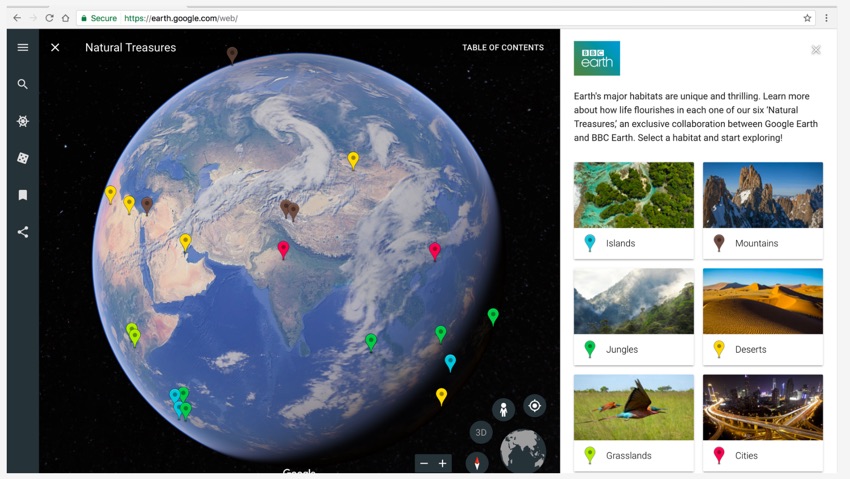
- I also love the 3D button that gives a more realistic perspective.

- They’ve also added a I’m Feeling Lucky option much like the one in their Search tool. Click the dice icon along the left and you end up wherever their random number generator decides to drop you. Google uses Wikipedia and its own database to provide some basic information and photos of each place you randomly fly to. Most of the sites include a Points of Interest list that’s informative or a Other Places to Explore button.

It’s a fun little gadget, I suppose. I think you could use it to introduce geography concepts to your kids. Maybe use it as a writing prompt. You might use it to jump start discussions about differences between various parts of the world, human and physical geography, identifying geographic features, and maybe talk about ways to add additional information to the basics that Google provides. But it’s the obvious randomness that you’ll need to deal with that makes the I’m Feeling Lucky button a bit awkward.
- It’s very easy to share places you visit. Simply travel to where you want to go and click the Share button along the left hand side. You’ve got the option to get a specific link or share via social media.
- You can also favorite locations that you travel to and find. When the info card pops up, click the bookmark icon in the bottom left corner and you can add that location to your Favorites file. These bookmarks then live in the My Places folder along the left side.

So. Some good stuff. The obvious plus for me is the expanded ability to work on Chromebooks. But, and I suppose I shouldn’t get too picky, but . . . seriously Google. You’ve got some pretty smart people on board over there. You couldn’t have included some of the sweet features from the desktop version?
My dislikes:
- The inability to create tours. The online version doesn’t allow you or your students to build interactive tours that have embedded multimedia elements. This lack of a creation option is a huge let down for me. And, yes, we can use Google My Maps to create tours. And then export those as KML or KMZ files. And then import those files into the My Places are in this version of GE. Or export and then import KML files from the desktop version.
- But come on. The My Maps tours are the JV wannabe versions of the full GE Pro option. And if you can embed the ability to create tours in My Maps, how hard would it be for you to do the same thing with this online version of GE? (And the imported versions don’t always display the file in the way it was originally created.)
- Maybe I’m missing something but there doesn’t seem to be the ability to tilt or rotate the view. In the varsity GE version, I’ve got that little joystick like control button that lets me spin the view and tilt at different angles. The new version only lets me move east, west, north, or south. Again . . . how hard would it be to let me control the view Google engineer people?
- We’re also missing all of the incredible layers that we could turn on or off. No Panoramio image layer. No Gallery layer. No Gigapixels. No Rumsey Historical Maps. Nothing.
- No Historical Imagery button. No Placemark button. No ruler. No image overlay.
I get it. Google is moving to online and mobile rather than installed desktop tools. I get it. There’s My Maps to do some of this. But I want the ability to move kids along the SAMR / Bloom’s / Depth of Knowledge / more complex thinking and creation path and this version isn’t doing me any favors.
Final verdict?
The latest version makes geography more accessible to Chromebook users. But this seems like a pale imitation of the much more robust Google Earth Pro desktop option.
Get the Google PR blast about their new toy and then head over to the GE page to try it out, get resources and tutorials (for both new and old versions,) and download the desktop Pro version.
And I’ve got an older page with some GE resources and teaching ideas that is still golden for providing ideas and materials.
Have a great time!