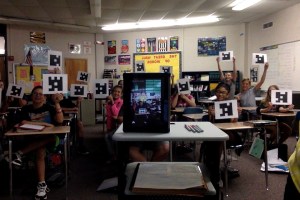
 I was recently introduced to an awesome piece of technology that allows you gather real-time data when giving formative assessments. Plickers (paper/clickers) is a mobile app linked to the Plickers website that gives teachers the ability to test students using mobile devices, even if they don’t have any devices for their students. Continue reading Low On Devices? Plick this App!
Category Archives: technology
USGS historical topo maps

Maps are so cool. Historical maps are way more cooler. And online historical maps are even way more cooler. (I like saying way more cooler cause it makes me feel like a rebel.)
A couple of months ago on the helpful GoogleMapsMania site, I ran across a way cool tool created by the United States Geological Survey. This is the group that, among other things, is responsible for creating topographic maps.
The cool tool that the USGS has created is called USGS Historical Topographic Map Explorer.
Basically, you do a map search with a Google Maps-like interface, click on a specific place on the resulting map, and the Historical Topographic Map Explorer will provide a timeline with topo maps from the past.
You can then select maps from Continue reading USGS historical topo maps
Get the KCSS fall update. And try out Smore
KCSS is giving an online tool called Smore a test drive for publishing our quarterly newsletter. First things first. Head over and get the newsletter here.
But I also think that Smore is a handy tool for teachers and students for creating all sorts of products and projects. It seems very easy to use and has some cool sharing tools.
Create a free account and Continue reading Get the KCSS fall update. And try out Smore
Edudemic, handy teacher guides, and how-tos
Okay. I’m a bit off task but does the lack of an apostrophe in “how-tos” bug anyone else? Pretty sure this is correct but it sure looks weird. Especially when my built-in spell checker is telling me it’s wrong.
Anyway . . . where were we?
Handy teacher guides and how-tos.
Edudemic is not a social studies site but it is a very sweet place to catch up on your tech integration knowledge. The tagline says it all: Continue reading Edudemic, handy teacher guides, and how-tos
Tools 4 Students
I promise I’m not going to spend the whole blog using text language! Tools 4 Students and Tools 4 Students 2 are actually the names of a great app that I use in my classroom to get students working with technology and cutting down on the amount of time that I have to spend in front of a copy machine.
Between the two versions of this app there are 50 different graphic organizers that are both premade and editable for teachers and students to create their own. Continue reading Tools 4 Students

